
I recently counted every small task my household repeats each week, from adjusting the thermostat to hand-watering garden beds, switching off forgotten lights, and managing parcel deliveries. The total pushed past seventy actions, and most of them did not need a person at all.
Most smart-home advice still leans on resale value or gadget hype. That misses the real test, which is whether your home feels easier to live in on a busy Monday than it did a month ago.
Lifestyle return on investment is a better filter. It looks at comfort gained per dollar, minutes saved each week, and stress that disappears because the house now handles routine jobs for you.
A sensible plan starts with the backbone, moves to fast wins, then adds larger systems only when the basics are ready. That approach fits Australian homes, local rules, and the way most households stage spending over time.
What ‘Lifestyle Value’ Means in an Australian Home
Lifestyle value is daily comfort and ease you can measure, not a vague feeling.
I use five markers: minutes saved per week, hours spent in the 18 to 26 C indoor comfort band, noise reduced, litres of water saved, and repetitive tasks removed. If an upgrade cannot improve one of those, it is probably a want rather than a need.
A few terms help here. The backbone is the wiring and network fabric that supports devices. Scenes are pre-set actions, such as one button that locks doors, dims lights, and lowers blinds. Solar soak means running appliances when rooftop photovoltaic, or PV, generation is strongest so you use more of your own solar power.
That strategy is no longer niche. Australia had more than 4.29 million solar PV installations as of December 2025, so shifting daytime loads is practical for a very large share of households.
Three Big Benefits for Australian Households
The best upgrades pay off through comfort, time, and lower bill pressure.
Comfort and Wellbeing on Autopilot
Good automations smooth out daily discomfort without adding more buttons to press. Occupancy sensors handle hall and bathroom lights, adaptive dimming softens evenings, and pre-cooling during solar hours can make the house comfortable before you get home.
Thermostat discipline matters more than most people expect. Each one-degree change in setpoint can alter energy use by roughly five to ten percent, so cooling at 24 to 26 C and heating at 18 to 20 C usually protects comfort while cutting waste.
Time and Convenience Every Week
Small changes stack fast. A Goodnight scene, sensor lights in key paths, geofenced garage access, and parcel-friendly entry options can remove ten to fifteen micro-tasks a day.
I keep a short list of repeated household jobs and cross them off as they disappear. That makes the value visible, especially when a modest upgrade saves several interruptions every evening.
Energy Cost Stability and Resilience
Efficient hardware works best when smart controls schedule it well. LEDs, heat pumps, and solar-soak routines reduce grid use, and rooftop solar supplied 14.2 percent of Australia’s electricity in the second half of 2025, which makes daytime load shifting worth the effort.
LEDs use about 75 percent less energy than halogens and last five to ten times longer. With halogen lamps being phased out from October 2025, the switch is already moving from optional to necessary. Stable NBN fibre also matters because streaming, cameras, and cloud automations fail quickly on a weak connection. NBN Co’s fibre upgrade program aims to make around 90 percent of the fixed-line network eligible for near-gigabit speeds by December 2025.
Start Here, Build the Electrical and Connectivity Backbone
Reliable power and data make every later upgrade safer, faster, and more useful.
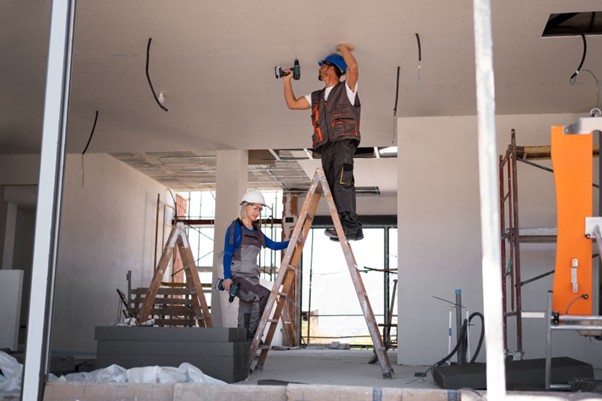
Start at the switchboard. Check for current RCDs, or residual current devices, MCBs, or miniature circuit breakers, surge protection, and spare capacity for future loads. Plan dedicated circuits for heavy or sensitive equipment such as EV chargers, AV racks, and heat-pump hot water. In Australia, mains electrical work must be completed by a licensed electrician and tested to AS/NZS 3000.
Then fix the network. If fibre to the premises, or FTTP, is available, use it. Run Ethernet to the office, TV wall, and wireless access point locations, and hardwire access points instead of leaning on extenders. Smart-home appliance use reached 26 percent of Australian adults in the year to June 2024, so the average home network is carrying more traffic than it did only a few years ago.
Quick Wins You Can Do in a Weekend
Low-cost changes can improve comfort and reduce waste almost immediately.
Swap halogens for warm-dim LEDs in living spaces, add motion-based night lighting in corridors, and use smart plugs to cut standby power around televisions, routers, and game consoles. These are small jobs, but they remove daily friction and trim wasted electricity from day one.
Most homes also gain from a thermostat eco offset. A one-degree adjustment can trim energy use by five to ten percent with little change in comfort, especially when ceiling fans help move conditioned air.
High-Impact Systems Worth Designing In
Large systems deliver the biggest payoff when they are planned as part of the house, not added as afterthoughts.
Smart Climate Control
Zoning and steady setpoints usually beat constant manual tweaking. Add compatible smart controls to reverse-cycle air conditioners, pre-condition during PV generation, and use ceiling fans on low to spread heated or cooled air more evenly through occupied rooms.
Heat-Pump Hot Water and Laundry Timing
Heat-pump hot water uses less electricity than a standard resistive tank and pairs well with daytime solar production. Set timers to run in peak PV hours, insulate hot-water pipes, and schedule cold-wash laundry for the same period. Victoria’s Solar Homes Program can reduce upfront cost for eligible homes through rebates for solar PV and hot water.
Security and Access Without the Hassle
Smart locks and video doorbells cut missed deliveries and reduce key juggling. Choose products with local storage or a reputable cloud platform, enable two-factor authentication, and place cameras with neighbours, privacy rules, and strata by-laws in mind.
Water-Wise Gardens and Outdoor Comfort
Outdoor areas can consume up to 40 percent of household water, so the garden deserves the same planning as the kitchen or living room. Zone beds separately from lawn, use drip irrigation with soil-moisture and rain sensors, and favour native planting that suits local conditions. Studies indicate smart irrigation controllers save roughly 20 to 50 percent of landscape water compared with fixed schedules. Add low-glare path lighting and shade in the right places, and a trusted landscape design company can help the yard shift from a weekly chore to a practical extension of the home.
Trusted Landscape Design Company
Outdoor upgrades work better when planting, drainage, irrigation, lighting, and hardscaping are planned together.
Getting one element right is easy enough. Making drip lines, soil preparation, paved areas, lighting circuits, and planting zones work through summer heat and winter rain is harder. A strong design coordinates water flow, root space, slip resistance, maintenance access, and how the space will actually be used on weekday evenings, not just in photos.
That matters even more in Melbourne, where soil types, council overlays, and water restrictions can change from one suburb to the next. Smart controllers and drought-tolerant planting help, but they need a layout that matches the site. For households trying to turn separate ideas into one durable outdoor plan, engaging an experienced landscape team like Love It Landscaping makes the investment feel coherent and far easier to maintain.
Entertainment and Whole-Home Audio
Entertainment spaces reward planning before purchase. Cable paths, outlet locations, screen height, seating distance, and acoustic treatment shape the result more than a premium logo on a speaker box.
Pre-wire for subwoofers and height channels even if you will not install them yet. Service loops, rack ventilation, and hidden conduits behind skirting or cornices make later changes cheaper and less disruptive. In open-plan homes, it also helps to separate the viewing zone from busy traffic paths so the room works for both movies and everyday family use.
Acoustics deserve special attention because hard surfaces can make a good system sound harsh. Rugs, curtains, shelves, and targeted absorption at first-reflection points can clean up dialogue and reduce listener fatigue without turning a lounge room into a studio.
Commissioning matters too. Once speaker distances, level trims, and crossover settings are calibrated to the room, mid-range gear can outperform far more expensive equipment that was never tuned properly.
Home Theatre Systems Melbourne
Home theatre works best when the room, layout, and speaker plan are chosen together.
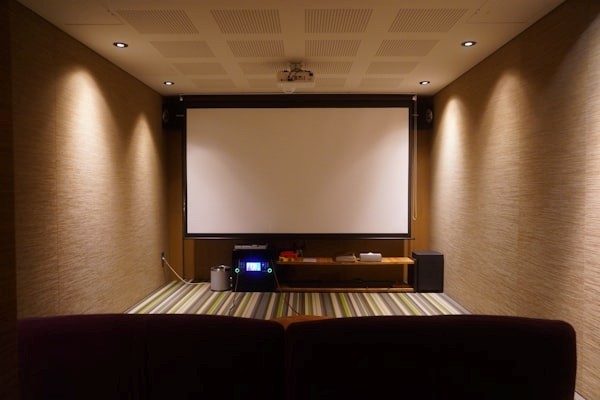
Melbourne homeowners can lose weeks comparing amplifiers and speaker packs before settling the basics. A better starting point is the room itself, including dimensions, seating position, ceiling height, and how dark and quiet the space can become during use.
A simple commissioning checklist keeps decisions grounded. Measure the room, map cable runs for speaker wire and HDMI, note likely acoustic treatment points, and decide whether the space suits 5.1.2 or 7.1.4. Rooms under 25 square metres usually do very well with 5.1.2, while larger dedicated rooms can justify 7.1.4 with four overhead channels.
It also helps to think about how the room will be used outside movie night. If the same space handles sport, gaming, and casual television, easy control, tidy wiring, and stable streaming may matter more than chasing the loudest possible output.
For households that want package options matched to room size rather than endless product sorting, keep a short checklist beside the shortlist: room dimensions, seating distance, likely acoustic treatment points, equipment ventilation, wiring pathways, and realistic listening goals should all be settled before any pack is chosen. Once those basics are clear, comparing home theatre systems Melbourne from Amplify AV becomes a more practical buying path because amplifier and speaker pairing is already narrowed to fit the space.
Who to Hire and How to Buy
Qualified people and approved products reduce risk long after the installation day is over.
For solar PV, use SAA-accredited designers and installers and choose CEC-approved products so the system stays eligible for Small-scale Technology Certificates under the SRES. Confirm eligibility before signing because rebate rules, approved product lists, and deadlines can change.
For electrical work, insist on AS/NZS 3000 compliance and an electrical safety certificate. Never do DIY mains wiring. It is illegal, unsafe, and can void insurance. On complex AV or network projects, a CEDIA-certified integrator can also provide as-built drawings, device lists, and labelled cabling that save time on future maintenance.
Budgeting and Staging Without Regret
Staged spending works best when each phase delivers value on its own and supports the next step.
A useful budget split is 40 percent for backbone work, 25 percent for quick wins, and 35 percent for larger systems, with another 10 percent kept aside for surprises such as patching, switchboard issues, or old wiring that needs correction. That reserve is rarely wasted in older homes.
For a typical 1970s brick-veneer house, the order is usually clear. Start with switchboard improvements, FTTP activation, Wi-Fi 6E, and Ethernet runs. Then move to LEDs, sensors, and blinds. After that, add heat-pump hot water, irrigation, and theatre pre-wire. Rooftop PV and a battery can follow when the budget is ready because the earlier work will already support them.
Measure Your Lifestyle ROI
Simple tracking shows whether a smart upgrade actually improved daily life.
Use before-and-after measures in four areas: energy from smart-meter apps, comfort from room sensors logging hours in the 18 to 26 C band, water from irrigation reports, and convenience from a short weekly checklist of tasks that no longer need attention. The goal is not perfect data. It is clear evidence that the house now works harder than you do.
Even a basic spreadsheet can show the shift. Seven fewer lights-off reminders, four skipped hand-watering sessions, and three avoided parcel runs each week are real gains, and they add up quickly across a year.
Make the Upgrades Work for You
The smartest homes are the ones that quietly remove effort from ordinary days.
Start with power and connectivity, prioritise comfort per dollar, and bring in licensed professionals where the work affects safety or compliance. When the backbone is right, the rest of the upgrades stop feeling like gadgets and start feeling like relief.
FAQ
These short answers cover a few common sticking points.
Do I Need a Hub for Smart Home Devices?
Not always. Many devices now work over Wi-Fi or support Matter, a shared smart-home standard. A hub or bridge becomes useful when the home is larger, the device count rises, or you want the better reliability that Zigbee and Z-Wave systems can offer.
Will These Upgrades Add Resale Value?
Well-documented, standards-compliant upgrades usually help buyer confidence because they improve liveability and reduce uncertainty at inspection. Comfort, efficiency, and resale appeal tend to align when the work is practical and not gimmicky.
How Do I Avoid Cloud Lock-In?
Choose platforms that support local control, backup export, and open standards where possible. Keep a simple inventory of device names, IP addresses, apps, and login details so you can replace one brand without rebuilding the whole system.